Right to be Forgotten
Any user can irreversibly erase their Marvin account and associated personal information from the account menu. This voluntary action is immediate; it is separate from inactivity cleanup, which provides notice and a staff-assisted recovery period.
What Happens When You Delete Your Account
Erasing your account is irreversible. Your personal information is removed and retained shared-project jobs and usage are dissociated from your identity. Staff cannot restore a voluntarily erased account.
Effect on Projects
When your account is deleted, you are removed from all project memberships and administrator roles. Your personal project is closed and can no longer accept new job submissions.
Shared projects and their retained jobs, results and usage are not deleted with your account. A shared project can be left without an administrator until staff appoint a replacement. Personal and shared projects follow their own lifecycle policy; account erasure does not automatically shorten project retention.
If you are the sole member or administrator of a shared project and need to transfer ownership before deleting your account, please contact support in advance.
How to Delete Your Account
- Log in to qx.vtt.fi.
- Open your account menu.
- Select Delete Account.
- Confirm by entering
DELETE MY ACCOUNTwhen prompted. A modal will appear asking you to type the confirmation phrase before the deletion is finalised.
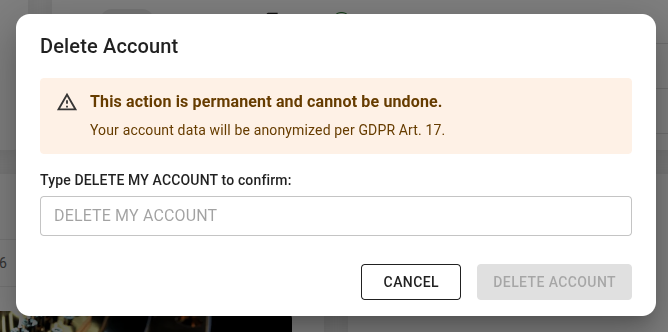
The deletion takes effect immediately upon confirmation.
External identities and copies
This operation erases your identity in Marvin. It does not delete your Azure or Keycloak sign-in identity, external job artefacts or backup copies. These follow their own retention and erasure policies; contact support if you need help with them.